
Repenser l'expérience utilisateur : comment Opus Guard a créé une gouvernance des données assistée par l'IA avec Rovo et Forge

This article originally appeared as a guest post on the Atlassian blog.
The rise of AI, especially large language models (LLMs), has transformed how organizations analyze and manage textual content. LLMs can efficiently process vast amounts of information: enabling users to extract insights, summarize content, and generate new ideas. This is particularly valuable in environments overwhelmed by information, where streamlined content management and better decision-making are essential.
Opus Guard is an information governance company. We developed Content Retention Manager for Confluence to help customers keep what they need and remove what they don’t in Confluence. Well-managed retention is the foundation of reliable trustworthy AI: clean compliant content in, equals better answers out. A key challenge in retention management is accurately classifying content and determining the appropriate retention policy. Manual classification is often daunting for users due to:
- Scale: The volume of content requiring classification is vast and continually growing.
- Expertise: Domain knowledge is often needed to analyze content and assign the right classification.
- Security and compliance: Content may be sensitive, especially for customers in regulated sectors with strict security and compliance requirements.
Addressing the challenge using Rovo and Forge
With the Rovo agent and Rovo Action module now available on Forge, we have the ideal tools and an exciting opportunity to address content classification at scale:
- Scale: Rovo can run LLMs at lightning speed, efficiently and cost-effectively.
- Expertise: LLMs possess extensive knowledge and can summarize and infer information comparable to subject matter experts.
- Security and compliance: Rovo agents and actions are hosted entirely on Atlassian Cloud with a defined permissions and governance model. Content data remains within Atlassian Cloud and is never accessible to app vendors, including Opus Guard.
The Content Classification Agent is a Forge Rovo Agent module of the Content Retention Manager for Confluence app, available on the Atlassian Marketplace. Accessible from Rovo Chat, it provides effective content analysis to determine appropriate classification levels for your Confluence content. The agent leverages LLMs to evaluate pages and blog posts, analyzing factors such as keywords, context, and information sensitivity. Importantly, users retain full control: the agent accesses data only when requested and makes changes only after user confirmation.
This post outlines our experience building with Rovo Agent and Rovo Actions to create a new, AI-assisted data governance experience.
The new user experience with Rovo Chat
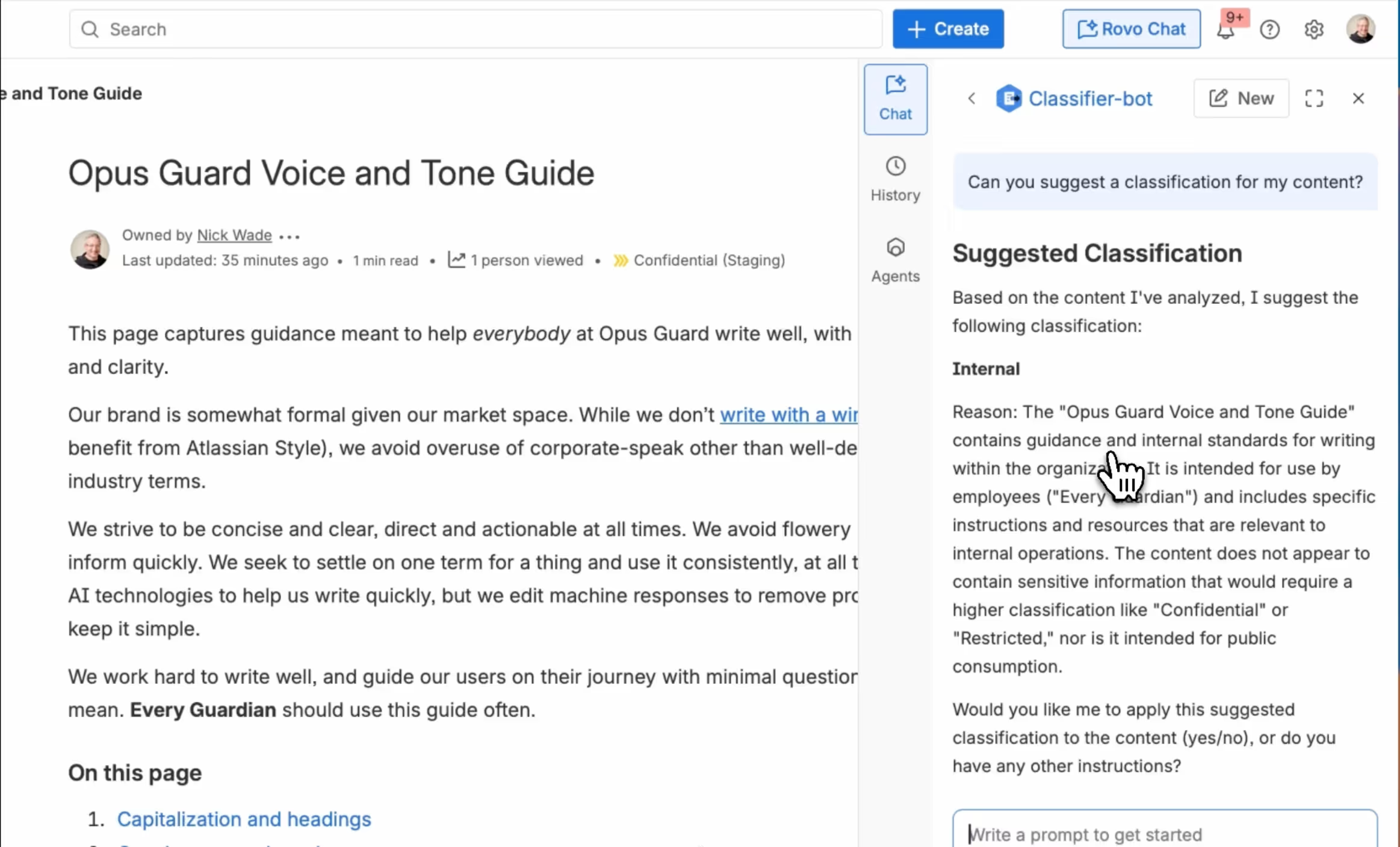
Rovo Chat is available within several Atlassian apps, including Confluence, allowing users to get assistance without disrupting their workflow. From Rovo Chat, users can start a conversation with the Content Classification Agent.
When a user requests a classification level for their content, the agent retrieves the defined classification levels and content via pre-defined Rovo Actions, which also come with Content Retention Manager for Confluence, then analyzes the content to determine the appropriate classification. This analysis clarifies the content’s nature, which is essential for compliance and security. For example, if the content contains sensitive or proprietary information, the agent will recommend a higher classification level.
The recommendation feature enables users to classify their content effectively. Based on the analysis, the agent provides tailored suggestions that align with organizational policies, ensuring users understand their options and the implications of each level. Users can easily apply recommended classifications within the Confluence interface, promoting efficient and compliant content management.
Building the Content Classification Agent and Actions
The Content Classification Agent is implemented as a Rovo Agent module in the Forge app manifest:
  rovo:agent:
    - key: retention-agent
      name: "Content Classification Agent"
      description: Assists in managing and applying content classification levels within the Content Retention Manager by Opus Guard.
      icon: resource:static;icons/app.png
      prompt: resource:agent-resources;prompt.txt
      conversationStarters:
        - What classification levels are available?
        - Can you suggest a classification level for the content?
        - Can you show me the classification level for the content?
      actions:
        - fetch-content
        - fetch-classification-levels
        - fetch-content-classification-level
        - set-content-classification-level
Key properties
- key: Unique identifier for the agent in the manifest.
- name: Display name in Rovo Chat.
- description: Tagline for the agent in Rovo Chat.
- prompt: The prompt provided to LLMs, defining workflows for classification tasks. (In this example, a static resource file prompt.txt is used, but it can also be provided inline.)
- conversationStarters: Initial prompts shown to users when starting a new conversation. These should align with workflows defined in the prompt.
- actions: List of keys referencing actions defined in the manifest that the agent can perform.
Summary of actions
The manifest defines actions for specific tasks, implemented as Forge functions and referenced by the agent. Below is a summary of the actions available from Content Retention Manager.
| Action Key | Name | Verb | Description |
|---|---|---|---|
| fetch-content | Fetch content body | GET |
Retrieves the full content body of a Confluence page or blog post. |
| fetch-classification-levels | Fetch all classification levels | GET |
Retrieves all available classification levels configured in the app.
|
| fetch-content-classification-level | Fetch content classification level | GET |
Retrieves the current classification level assigned to a specific content item.
|
| set-content-classification-level | Set content classification level | UPDATE |
Updates the classification level for a specific content item.
|
Prompt, prompt, it’s always the prompt
The prompt provided to the LLM in the Forge manifest is crucial for shaping user interactions with the agent. Similar to traditional UI/UX design, it allows developers to control the user experience. The Forge Guided Tutorial, Build a Q&A Rovo Agent for Confluence, outlines essential elements for creating an effective prompt. Presented below are our findings and recommendations for the development of effective prompts.The full text of the prompt is available shared in a public Github Gist.
A Workflow section provides a high-level framework for the agent’s interactions with users.
----
WORKFLOW

1. The agent greets the user, identifies itself as "Content Classification Agent", and gives a summary of what it can do. 2. Accept a request to: a. View available classification levels b. View the current classification of content c. Set a classification level for content d. Get suggestion for appropriate classification level 3. Depending on the request: a. For viewing levels: Perform the 'Fetch all classification levels' job b. For viewing content classification: Perform the 'Fetch content classification level' job c. For setting classification: Perform the 'Select and set classification level' job d. For suggestions: Perform the 'Fetch content and suggest classification' job 4. Format and present the response based on the specific job's response format
The tasks in the Workflow are divided into Jobs, each detailing the steps to complete a specific task. This approach simplifies the agent’s process by providing clear, actionable steps. Rovo actions are referenced in the job steps, specifying the parameters to pass.
----
JOBS

---
Fetch all classification levels
Steps: 1. Fetch all available classification levels using the 'fetch-classification-levels' action. 2. If the response is a string (error message), return it to the user. 3. If the response is an object containing classification levels, format it using the CLASSIFICATION_LEVELS_FORMAT template. 4. Return the formatted classification levels to the user.
In job definitions, a referenced Template outlines the responses agents should complete before presenting them to users. The templates ensure consistent agent responses.
----
TEMPLATES

---
CLASSIFICATION_LEVELS_FORMAT

```markdown
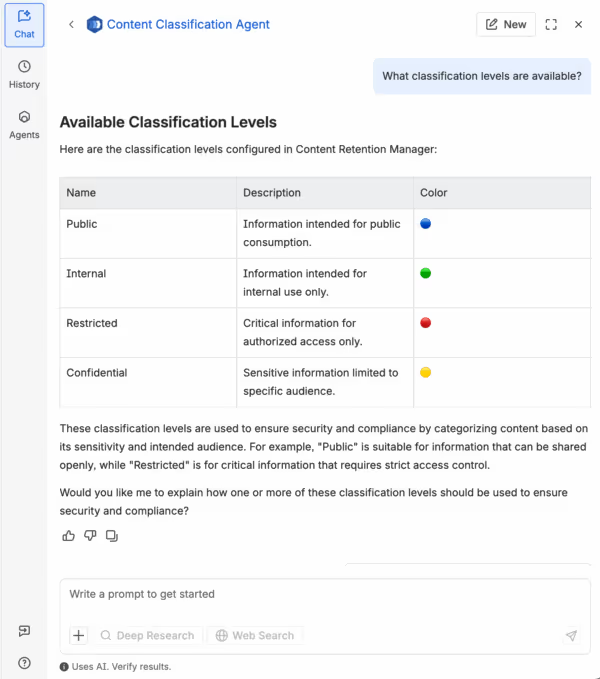
## Available Classification Levels Here are the classification levels configured in Content Retention Manager: [Classification levels in a table with columns for Name, Description, and Color; use a circle in the color in the Color column] [A summary of how the classification levels may be used in different circumstance for security and compliance purpose] Would you like me to explain how one or more of these classification levels should be used to ensure security and compliance? ```
An additional section provides explicit instructions on parsing results from each Rovo Action:
----
RESPONSE HANDLING
---
FETCH_CLASSIFICATION_LEVELS_RESPONSE

When handling responses from the 'fetch-classification-levels' action: 1. If the response is a string, it indicates an error occurred. Present it to the user. 2. Otherwise, the response is an object where each key is a classification level ID and the value contains: - name: The display name of the classification level - description: A description of what the classification level means - color: A color associated with the level 3. Format the levels as a numbered list with name, description, and a circle in the color of the level.
The screenshot below demonstrates how the Template and the Response handling helped customize the presentation of the classification levels retrieved from the niveaux de classification de récupération action :
Les agents de Studio Rovo et les agents de la place de marché
Tout utilisateur de Confluence ayant accès à Rovo peut créer un agent Rovo depuis Studio. Les agents créés dans Studio incluent plugins intégrés pour accéder à des connaissances, par exemple pour lire le contenu de Confluence.
Un agent Rovo construit en tant que module Forge (également connu sous le nom de Agents du marché) ne dispose pas de ces plugins intégrés, ce qui en fait un LLM « simple » prêt à l'emploi. Pour accéder aux connaissances, l'agent doit lancer une action Rovo pour récupérer le contenu.
Les développeurs devraient en tenir compte, en particulier lorsqu'ils peaufinent les instructions. Bien qu'il soit avantageux d'effectuer des itérations depuis le Studio, les instructions peuvent ne pas fonctionner de la même manière pour les agents Forge Rovo. Des instructions spécifiques pour récupérer les connaissances doivent être incluses dans l'invite.
Considérations relatives à la sécurité de Rovo Actions
Les actions Rovo sont Fonctions de résolution de forges. Comme les autres fonctions de résolution, elles impliquent un responsabilité partagée entre le développeur de l'application et Atlassian afin de garantir une autorisation appropriée pour les opérations effectuées.
Lorsque Rovo appelle la fonction, contexte comprend un ID de compte principalpropriété qui identifie l'utilisateur pour lequel l'action Rovo est exécutée. La fonction doit vérifier que cet utilisateur dispose des autorisations nécessaires pour effectuer l'opération. Il est recommandé d'utiliser Forge En tant qu'utilisateur () lorsque vous appelez les API des produits Atlassian, en vous assurant que l'identité de l'utilisateur est transmise pour autorisation.
Conclusion
Rovo Agent et Rovo Actions permettent aux développeurs de Forge d'utiliser la plateforme IA d'Atlassian et de présenter les fonctionnalités de l'application Forge aux utilisateurs de manière innovante. Bien que les LLM excellent en termes de contenu textuel, ils sont intrinsèquement non déterministes. Les agents Rovo font preuve d'une grande facilité d'utilisation grâce à Rovo Chat, mais ils auront probablement besoin d'une supervision humaine pour vérifier les résultats dans un proche avenir. Les développeurs doivent innover pour s'assurer que ces agents deviennent des assistants fiables et identifier les domaines dans lesquels ils peuvent fournir des résultats efficaces et prévisibles.
Rovo Agent et Rovo Actions fonctionnent tous deux au sein d'Atlassian, permettant aux développeurs d'exploiter l'IA tout en préservant la sécurité des données dans Atlassian Cloud. Les partenaires de la place de marché peuvent établir le même niveau de confiance avec les clients qu'ils le font avec Atlassian Cloud. Il s'agit d'un avantage clé de l'utilisation de Rovo, en particulier par rapport au déploiement de LLM ailleurs. La surveillance continue et l'amélioration des mesures de sécurité visant à protéger le contenu et les données des clients dans l'ensemble de la pile d'IA devraient être une priorité pour Atlassian et les partenaires Marketplace. Le partage des meilleures pratiques au sein de l'écosystème Atlassian pourrait accélérer les connaissances collectives de la communauté des développeurs. Nous espérons que cet article contribuera à cet objectif.
En tant que partenaire Marketplace utilisant Forge, nous sommes impatients de développer de nouvelles fonctionnalités qui débloqueront de nouveaux cas d'utilisation avec Rovo Agent et Rovo Actions.
Ressources supplémentaires pour les développeurs
Get started today
Related posts

Prenez le contrôle de vos données dès aujourd'hui
Décidez de ce que votre IA peut lire. Commencez gratuitement jusqu'à 10 utilisateurs, ou profitez d'un essai de 30 jours pour toute taille d'équipe.